Tuesday, January 29, 2013

National ID/SSN columns HR Analytics W_EMPLOYEE_D dimension

By default, the Oracle BI Applications do not expose the columns for National Id/Social Security Number on the Employee dimension (W_EMPLOYEE_D).     Typically, there are policies in place within most organizations to closely control access to that information.

The physical columns W_EMPLOYEE_D are NATNL_ID_NUM, NATNL_ID_TYPE_CODE, NATNL_ID_TYPE_NAME.


They are exposed under the Dim - Employee logical table in the RPD but are not exposed at the presentation layer.
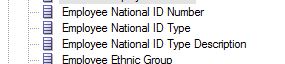

Those columns would have to be moved to a Presentation Subject area in order to make them available for reporting.   If necessary, separate security configuration may need to be applied to the column with application roles granting visibility.

The ETL mapping that  used to extract the National Id columns from Peoplesoft is:  SDE_PSFT_EmployeeDimension_Biography2, specifically in mapplet mplt_BC_PSFT_EmployeeDimension_Biography2.    It loads a table called W_PSFT_EMPLOYEE_D_BIO_2_TMP which is then loaded into the W_EMPLOYEE_DS staging table in the mapping SDE_PSFT_EmployeeDimension.

NOTE: Out of the box, the mapping only pulls the National Id's of employees with Work Permits.   It does not pull all Employee SSN's.     See below for a customization to bring in all SSN's.

The flow of the mapplet is from PS_PERS_NID to W_PSFT_EMPLOYEE_D_BIO_2_TMP for the National ID columns.


The SQL in the Source Qualifier in the mapplet can be modified to the following if all SSN/National Id values are required for all Employees versus just those on Work Permit:  (modified code in RED - just comment out the filter conditions).

SELECT
NID.EMPLID ,
CITIZENSHIP.COUNTRY,
NID.COUNTRY,
NID.NATIONAL_ID_TYPE ,
NID.NATIONAL_ID ,
CITIZENSHIP.CITIZENSHIP_STATUS,
VISA.COUNTRY,
VISA.VISA_PERMIT_TYPE,
VISA.DT_ISSUED,
VISA.EXPIRATN_DT,
'0' AS X_CUSTOM

FROM
PS_PERS_NID NID
LEFT OUTER JOIN
    (SELECT A.EMPLID, B.COUNTRY, C.CITIZENSHIP_STATUS
     FROM
     PS_CITIZENSHIP A, (SELECT EMPLID, MAX(COUNTRY) COUNTRY FROM
PS_CITIZENSHIP
                        WHERE (DEPENDENT_ID = ' ' )
                        GROUP BY EMPLID) B,
                        (SELECT EMPLID, COUNTRY, MAX(CITIZENSHIP_STATUS)
CITIZENSHIP_STATUS FROM PS_CITIZENSHIP
                        WHERE (DEPENDENT_ID = ' ' )
                        GROUP BY EMPLID, COUNTRY) C
     WHERE
     A.EMPLID = B.EMPLID
     AND A.COUNTRY = B.COUNTRY
     AND A.CITIZENSHIP_STATUS = C.CITIZENSHIP_STATUS
     AND B.EMPLID = C.EMPLID
     AND B.COUNTRY = C.COUNTRY
     AND (A.DEPENDENT_ID = ' ' )
    ) CITIZENSHIP ON
NID.EMPLID = CITIZENSHIP.EMPLID
LEFT OUTER JOIN PS_VISA_PMT_DATA VISA ON
NID.EMPLID=VISA.EMPLID
--AND NID.COUNTRY<>VISA.COUNTRY
WHERE
NID.PRIMARY_NID = 'Y'
--AND VISA.VISA_WRKPMT_STATUS in ('A','G')
--AND  (VISA.DEPENDENT_ID = ' ' OR
--LTRIM(RTRIM(VISA.DEPENDENT_ID)) IS NULL)
--AND (VISA.EFFDT = (SELECT MAX(EFFDT) FROM PS_VISA_PMT_DATA MAXI
--                   WHERE MAXI.EMPLID=VISA.EMPLID and MAXI.VISA_WRKPMT_STATUS in ('A','G') GROUP BY EMPLID) OR
--VISA.EFFDT IS NULL)


Tuesday, January 22, 2013

Oracle BI Applications quizzes

Two new quizzes have been added to the set of OBIEE online exams created by HCMinsight:
Oracle BI Applications Implementation
Oracle BI Peoplesoft HR Applications Implementation


These quizzes are intended for experienced OBIEE BI Applications developers who have installed and configured the 7.9.6.3 applications.

As with the other quizzes, these are free to take and require only minimal registration with Quizegg.   

Tuesday, January 8, 2013

Oracle Business Intelligence Applications Version 7.9.6.4 Released

A new release of the Oracle Business Intelligence Applications has been announced.   Version 7.9.6.4 is generally available from Oracle Technology Network (OTN).


Oracle Business Intelligence Applications 7.9.6.4 Documentation

7.9.6.4 Release Notes

Some key points from the release notes:

  • The minimum version of Oracle Business Intelligence Enterprise Edition required to run the Oracle BI Applications Installer is 11.1.1.6.4.   The installer does not check the version during the install and will not generate a BI Apps RPD file if the platform version is lower than 11.1.1.6.4.
  • 1.3.13 Revenue Ago Metrics Using GL_Accounting_Period_WID Not Supported by
    PSFT in Oracle Project Analytics
        This issue applies to Releases 7.9.6.3 and 7.9.6.4.
    PeopleSoft does not support Revenue Ago Metrics Using GL_Accounting_Period_
    WID.  Workaround: To use the metrics available in table "Ago Measures" from the Subject Area "Project Revenue", you must remove the foreign key joins on Period from these facts in the
    repository (RPD). The server then uses the Date foreign keys, resolving the problem.
  • 1.3.15 Writeoff LOC Amounts and Exchange Rates Incorrect in Oracle Project Analytics
    This issue applies to Releases 7.9.6.3 and 7.9.6.4.  The data sourced from PeopleSoft for the W_PROJ_RETENTION_F table shows incorrect data for Project Retention write off amounts if the transaction currency code is different from the GL currency code. Workaround: There is no workaround for this issue.
  • 1.3.36 Recruitment Metric "Time to Fill (Days)" Has Incorrect Denominator
    This issue applies to Release 7.9.6.3 only.
    The recruitment metric 'Time To Fill (Days)' calculates the number of days lapsed
    between when a requisition is opened and when it is closed. The formula is calculated
    as follows:
    sum(W_RCRTMNT_EVENT_F.RQSTN_OPEN_TO_RQSTN_CLOSE_DAYS) / nullif(count(distinct W_
    RCRTMNT_EVENT_F.JOB_RQSTN_WID), 0)
    The denominator should be Closed Requisitions not All Requisitions.
    Workaround
    The workaround for this issue is to apply the following change to the Oracle BI
    Enterprise Edition repository file (OracleBIAnalyticsApps.rpd):
    1. Backup the existing repository file.
    2. In the repository file, identify the logical fact table 'Fact - HR - Recruitment Event
    Information'.
    3. Locate the logical column 'Time To Fill (Days)'.
    4. Double-click the logical column and change the expression, as follows:
    From:
    Core."Fact - HR - Recruitment Event Information"."Time To Fill (Days) -
    Internal" / Core."Fact - HR - Recruitment Event Information"."Job Requisitions
    Count"
    To:
    Core."Fact - HR - Recruitment Event Information"."Time To Fill (Days) -
    Internal" / Core."Fact - HR - Recruitment Event Information"."Job Requisitions
    Closed"
  • 1.3.58 CURRENT_DAY Variable Defaults To A Static Value Instead of a Dynamic Value
    This issue only applies to Release 7.9.6.3.
    Dashboards that use the metadata repository variable CURRENT_DAY are showing
    invalid data because this variable is defaulted incorrectly to the static value 4-14-2011.
    Workaround
    1. Use BI Administration Tool to edit the BI metadata repository.
    2. Configure the value of the CURRENT_DAY variable to have the Default Initializer
    set to VALUEOF("LAST_REFRESH_DT").
    This can done by double clicking the CURRENT_DAY repository variable under
    the option Manage, then Variables, then Static.